
217 lines
8.0 KiB
Markdown
217 lines
8.0 KiB
Markdown
# UT Registration Plus
|
||
|
||

|
||
|
||

|
||

|
||

|
||
|
||
**UT Registration Plus (UTRP)** streamlines the process of registering for classes at UT Austin by reducing the chaos of juggling multiple tabs like Rate My Professor, Google Sheets, and the UT Course Schedule. With UTRP, you can simplify class selection and schedule management. We've all been there. 20 tabs of Rate My Professor, Google Spreadsheet, and the UT Course Schedule open and you still don't know what classes to take.
|
||
|
||
## Demo
|
||
|
||

|
||
|
||
## Features
|
||
|
||
- **Quick Access to Class Info**: For each class in the UT Course Schedule, UTRP provides a "breakdown" popup with direct links to RateMyProfessor, Course Evaluation Surveys (CES), and past syllabi.
|
||
- **Prerequisite & Restriction Highlights**: Displays course descriptions with highlighted details on prerequisites, restrictions, and other important info.
|
||
- **Grade Distribution Graphs**: View an aggregate and semester-specific graph of grade distributions for each course.
|
||
- **Saved Courses List**: Easily add courses to a list and view them in the extension popup. Copy unique numbers with a single click.
|
||
- **Conflict Detection**: Automatically highlights and strikes out courses that conflict with your saved courses in the UT Course Catalog.
|
||
- **Weekly Schedule View**: Displays your saved courses in a weekly schedule format for easier planning.
|
||
- **Multiple Schedule Support**: Create multiple schedules to plan for different registration scenarios.
|
||
- **And much more!**
|
||
|
||
## Toolchain
|
||
|
||
- React v20.9.0 (LTS)
|
||
- TypeScript
|
||
- Vite 5
|
||
- UnoCSS
|
||
- ESLint
|
||
- Prettier
|
||
- Storybook
|
||
- Figma
|
||
- Semantic-Release
|
||
- Custom Messaging & Storage Wrappers
|
||
|
||
## VSCode Extensions
|
||
|
||
We recommend using the following VSCode extensions to improve your development experience:
|
||
|
||
- **[ESLint](https://marketplace.visualstudio.com/items?itemName=dbaeumer.vscode-eslint)**: For identifying and fixing linting issues.
|
||
- **[Prettier](https://marketplace.visualstudio.com/items?itemName=esbenp.prettier-vscode)**: For automatic code formatting.
|
||
- **[Tailwind CSS IntelliSense](https://marketplace.visualstudio.com/items?itemName=bradlc.vscode-tailwindcss)**: For Tailwind CSS class autocomplete and IntelliSense.
|
||
- **[UnoCSS](https://marketplace.visualstudio.com/items?itemName=antfu.unocss)**: For better support with UnoCSS utilities.
|
||
|
||
## Contributing
|
||
|
||
Contributions are welcome and encouraged! To get started:
|
||
|
||
1. **Fork** the repository.
|
||
2. **Create a new branch**: `git checkout -b feature/your-feature`.
|
||
3. **Make changes** and ensure your code passes linting and formatting checks: `pnpm run lint` and `pnpm run prettier`.
|
||
4. **Commit your changes** following the [Conventional Commits](#conventional-commits--branch-naming-convention) specification.
|
||
5. **Push** your branch: `git push origin feature/your-feature`.
|
||
6. **Open a Pull Request**.
|
||
|
||
For significant changes, it’s recommended to open an issue first to discuss the proposed updates.
|
||
|
||
## Development
|
||
|
||
### Getting Started
|
||
|
||
1. Clone this repository: `git clone https://github.com/Longhorn-Developers/UT-Registration-Plus.git`
|
||
2. **Node Version**: This project requires the Node.js version specified in `.nvmrc`. Use [nvm](https://github.com/nvm-sh/nvm) to install and manage the correct version:
|
||
```bash
|
||
nvm install
|
||
nvm use
|
||
```
|
||
_Note: Installing the wrong Node version can lead to errors during setup._
|
||
3. Install dependencies using `pnpm` (which manages and patches dependencies):
|
||
```bash
|
||
pnpm install
|
||
```
|
||
|
||
Once set up, the extension can be built to the `dist/` directory using the following methods:
|
||
|
||
### Development Builds
|
||
|
||
- Run the development server:
|
||
```bash
|
||
pnpm dev
|
||
```
|
||
|
||
> **Note**: Injected content on UT pages may not display correctly in development mode. To develop with accurate styles, use the following command:
|
||
>
|
||
> ```bash
|
||
> NODE_ENV='development' pnpm run dev build --mode development -w
|
||
> ```
|
||
|
||
### Production Builds
|
||
|
||
- To generate production builds:
|
||
```bash
|
||
pnpm build
|
||
```
|
||
|
||
<details>
|
||
<summary>Beta Builds</summary>
|
||
|
||
Use `BETA=true pnpm build` to generate a beta build.
|
||
|
||
</details>
|
||
|
||
### Docker
|
||
|
||
This project includes a Dockerfile that allows you to build, zip, or run the extension in development mode using Docker. Refer to [Docker Dev Setup](./DOCKER_DEV_SETUP.md) to get started.
|
||
|
||
## Loading the Extension Manually
|
||
|
||
To load the extension manually in Chrome:
|
||
|
||
1. Open `chrome://extensions`.
|
||
2. Enable 'Developer Mode'.
|
||
3. Click 'Load unpacked'.
|
||
4. Navigate to the `dist/` directory and select it.
|
||
|
||
## Bug Reporting
|
||
|
||
If you encounter bugs or issues, please report them in the [Issues](https://github.com/Longhorn-Developers/UT-Registration-Plus/issues) section, including:
|
||
|
||
- A clear, descriptive title
|
||
- Steps to reproduce the issue
|
||
- Expected behavior
|
||
- Screenshots or logs (if applicable)
|
||
|
||
We aim to address issues promptly.
|
||
|
||
## Conventional Commits & Branch Naming Convention
|
||
|
||
We follow the **Conventional Commits** specification for commit messages. This ensures a consistent commit history and enables automated versioning and changelog generation.
|
||
|
||
### Commit Messages
|
||
|
||
Follow this structure for commit messages:
|
||
|
||
```
|
||
<type>(<scope>): <subject>
|
||
```
|
||
|
||
Where:
|
||
|
||
- **type**: One of the following:
|
||
- `feat`: A new feature
|
||
- `fix`: A bug fix
|
||
- `docs`: Documentation updates
|
||
- `style`: Code formatting changes (whitespace, semicolons, etc.)
|
||
- `refactor`: Code restructuring (without adding features or fixing bugs)
|
||
- `test`: Adding or modifying tests
|
||
- `chore`: Maintenance tasks or build process changes
|
||
|
||
Example:
|
||
|
||
```
|
||
feat(auth): add login functionality
|
||
fix(ui): align buttons in navbar
|
||
```
|
||
|
||
### Branch Naming
|
||
|
||
Branch names should follow the format:
|
||
|
||
```
|
||
<type>/<short-description>
|
||
```
|
||
|
||
Examples:
|
||
|
||
- `feat/user-login`
|
||
- `fix/navbar-layout`
|
||
- `docs/update-readme`
|
||
|
||
## License
|
||
|
||
This project is licensed under the MIT License. See the [LICENSE](./LICENSE.md) for more details.
|
||
|
||
## Code of Conduct
|
||
|
||
We maintain a strict code of conduct. By contributing, you agree to adhere to the rules outlined in [CODE_OF_CONDUCT.md](./CODE_OF_CONDUCT.md).
|
||
|
||
## Acknowledgements
|
||
|
||
Special thanks to the developers and contributors behind these amazing tools and libraries:
|
||
|
||
- React v20.9.0 (LTS)
|
||
- TypeScript
|
||
- Vite 5
|
||
- UnoCSS
|
||
- ESLint
|
||
- Prettier
|
||
- Storybook
|
||
- Figma
|
||
- Semantic-Release
|
||
- [chrome-extension-toolkit](https://github.com/sghsri/chrome-extension-toolkit)
|
||
- [UT_Grade_Parser](https://github.com/doprz/UT_Grade_Parser)
|
||
- [eslint-plugin-import-essentials](https://github.com/doprz/eslint-plugin-import-essentials)
|
||
- [UT Registration Plus v1.2.2.7](https://github.com/Longhorn-Developers/UT-Registration-Plus/tree/legacy) by @sghsri
|
||
- [UT Registration Planner](https://github.com/doprz/UT-Registration-Planner) by @doprz
|
||
- [Figma Designs](https://www.figma.com/design/8tsCay2FRqctrdcZ3r9Ahw/UTRP) by @IsaDavRod
|
||
- [Longhorn Developers](https://github.com/Longhorn-Developers) - established in 2024
|
||
- The UTRP devs, beta testers, and all supporters of the project!
|
||
|
||
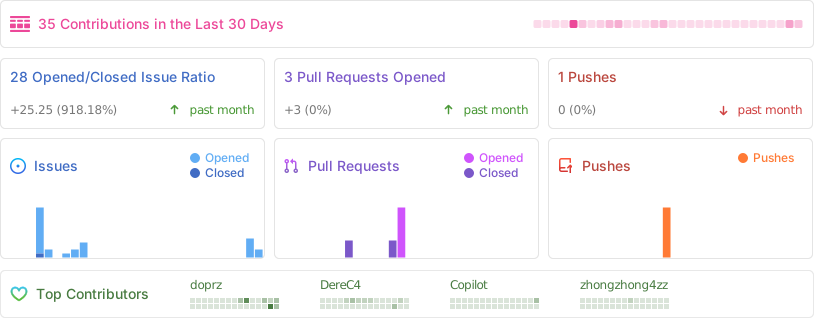
## Activity
|
||
|
||
|
||
|
||
## Star History
|
||
|
||
<a href="https://star-history.com/#Longhorn-Developers/UT-Registration-Plus&Date">
|
||
<picture>
|
||
<source media="(prefers-color-scheme: dark)" srcset="https://api.star-history.com/svg?repos=Longhorn-Developers/UT-Registration-Plus&type=Date&theme=dark" />
|
||
<source media="(prefers-color-scheme: light)" srcset="https://api.star-history.com/svg?repos=Longhorn-Developers/UT-Registration-Plus&type=Date" />
|
||
<img alt="Star History Chart" src="https://api.star-history.com/svg?repos=Longhorn-Developers/UT-Registration-Plus&type=Date" />
|
||
</picture>
|
||
</a>
|